We’ve been looking forward to this one. The Pertento AI editor is live, and it changes how you build A/B tests.
Until now, building a variant meant clicking through elements, hunting for selectors, or waiting for a developer to find time. You had the idea. Getting it onto the page was the slow part.
Now you just say what you want.
Describe it, and it’s built
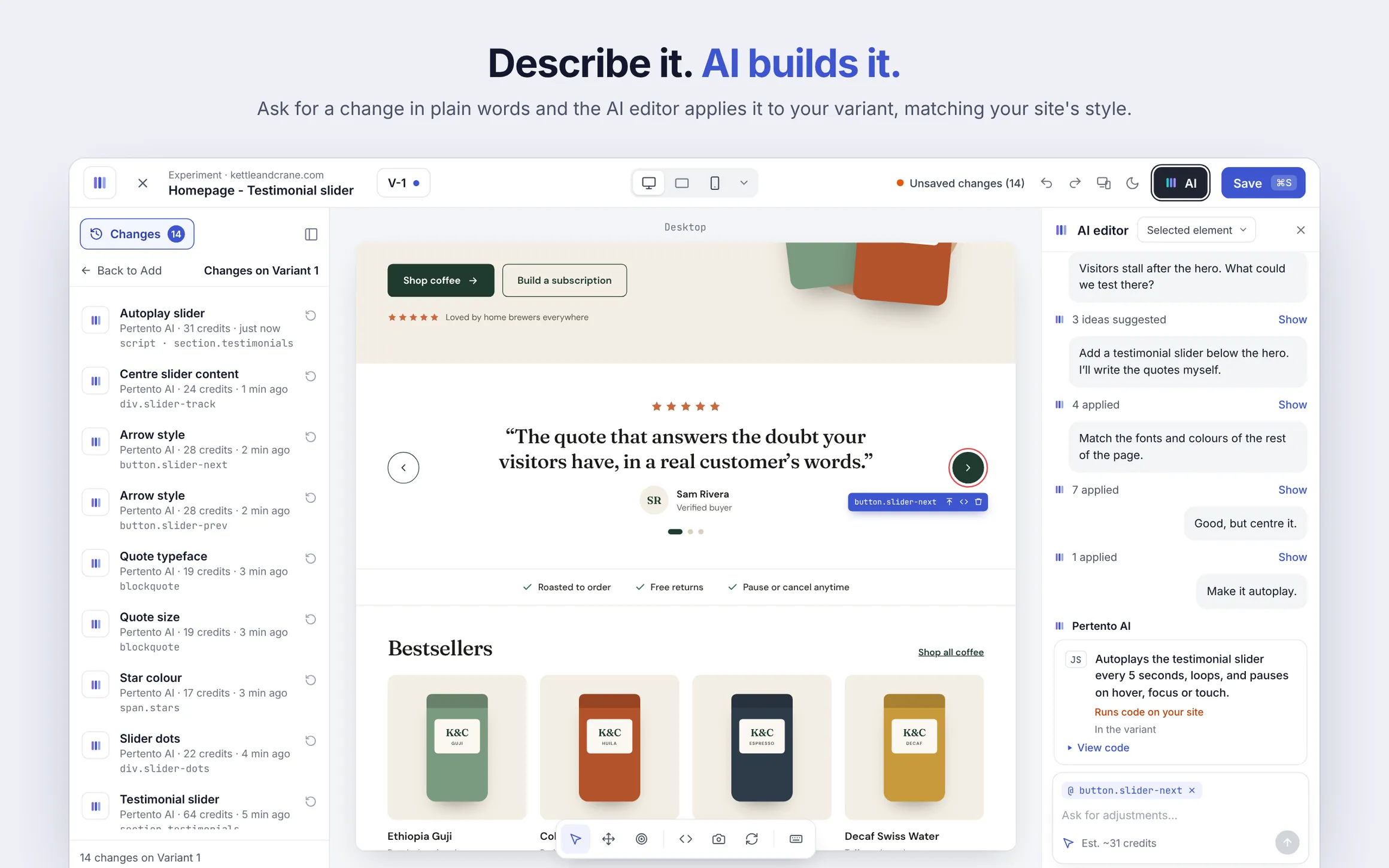
Open the editor and tell the AI what you’d like to change. “Make the headline about free shipping.” “Give the add-to-cart button more contrast.” “Rewrite the product description so it’s shorter and punchier.”
The AI editor reads your page, works out what needs to change and shows you the result right on your live site. Anything you see on the page can be changed: headlines, copy, images, colors, styles, whole sections.
You can describe a change for the whole page, or select one element first and focus on just that part.
You stay in control
Every proposed change shows up as a preview on your page, marked with an AI preview badge. Each one has its own checkbox, so you keep what you like and skip the rest.
Changes you apply become ordinary variant changes. You can tweak them by hand, or undo them in one step. Nothing is saved until you save the variant.
If a change needs custom behaviour, like reacting to a click or a scroll, the AI writes the code for it. You approve each block before it runs.
It speaks your language
Write in English, Swedish, Portuguese or whatever you work in. The AI replies in the same language, and your page’s copy stays in its original language unless you ask for a rewrite.
Your data stays private
Privacy has been at the core of Pertento from day one, and the AI editor is no exception. Emails, tokens and IDs are masked, and form values are left out before anything is sent. If there’s a part of a page you’d rather keep out of it entirely, you can exclude it with a simple attribute.
What it costs
Each request uses AI credits. The editor shows an estimate before you send, so there are no surprises.
Try it today
The AI editor is available now. Open the editor, click AI in the top bar and describe your first change.
Want to see it in action first? Take a look at the AI editor page, or start a free trial.
We can’t wait to see what you build.